

Powered Cache 4.0 is here.
This is more than a visual refresh or a collection of new settings. Version 4.0 represents a major step forward in how Powered Cache helps WordPress sites achieve reliable performance without demanding constant configuration.
The release introduces a completely redesigned settings experience, site-aware recommendations, a more dependable background processing foundation, and major improvements to Critical CSS and Remove Unused CSS in Powered Cache Premium.
Our goal was simple: make powerful WordPress performance optimization easier to understand, safer to enable, and more predictable across different hosting environments, themes, and plugins.

Table of Contents
What’s New in Powered Cache 4.0
At a glance, Powered Cache 4.0 includes:
- A redesigned and more focused settings experience
- Site-aware recommended settings
- A dedicated Optimization Advisor
- Automatic compatibility safeguards
- A new Critical CSS and Remove Unused CSS workflow in Premium
- More reliable background processing powered by Action Scheduler
- Improved preloading, lazy loading, CDN, and Google Fonts handling
- Safer exclusion rules with wildcard support
- Better configuration diagnostics and repair tools
- A smoother upgrade path from Powered Cache 3.x
Let’s take a closer look.
A Completely Redesigned Settings Experience

The Powered Cache settings area has been rebuilt around the way people actually configure and maintain a WordPress site.
Settings are now organized into focused sections for caching, file optimization, media, CDN, preloading, database maintenance, integrations, and tools. Moving between sections feels faster, related controls are easier to find, and descriptions provide useful context without overwhelming the screen.
Premium features remain visible to free users, making it easier to understand what each upgrade adds without disrupting the core settings workflow.
We also improved direct links, contextual documentation, validation messages, status feedback, and accessibility throughout the interface.
The result is a cleaner control center that works equally well for first-time users and experienced developers.
Recommended Settings That Understand Your Site
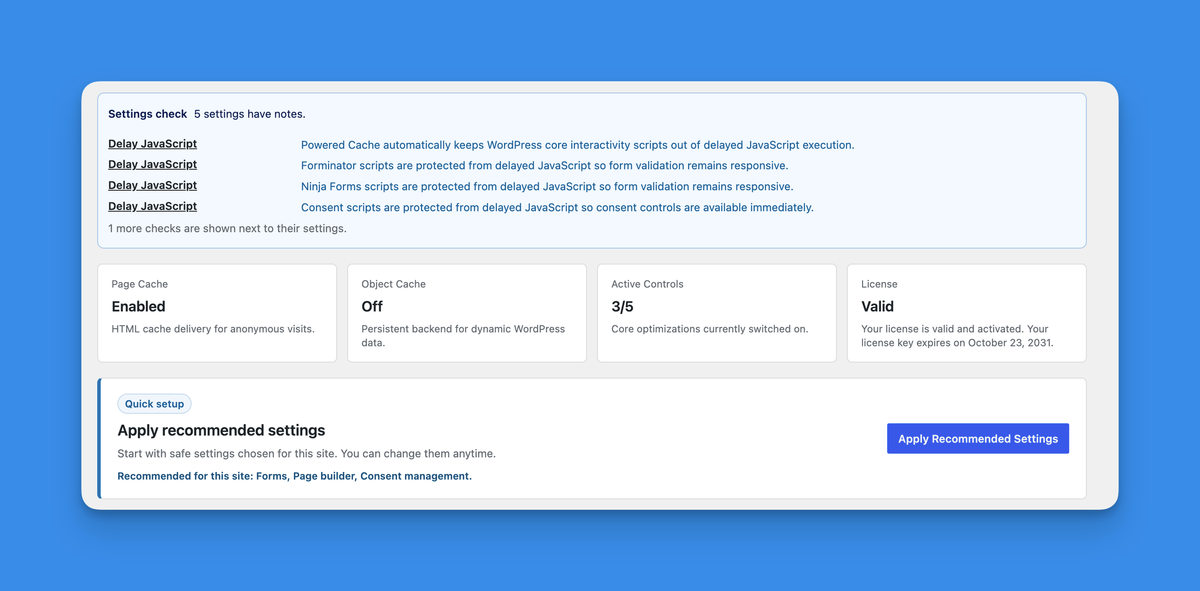
There is no universal configuration that works perfectly for every WordPress installation.
A WooCommerce store, a multilingual website, a managed hosting platform, and a simple publishing site can each require different optimization choices. Powered Cache 4.0 now considers signals from the current site and recommends a conservative starting point based on its environment.
Recommended Setup can account for factors such as:
- The server and hosting environment
- Active plugins and integrations
- E-commerce and multilingual functionality
- Available object cache drivers
- Existing cache layers
- Local or development environments
These recommendations are applied as editable defaults. They are not permanently enforced, and Powered Cache will not keep asking you to reapply them after you customize your settings.
You stay in control while benefiting from a safer initial configuration.
Meet the Optimization Advisor

Powered Cache 4.0 introduces a dedicated Optimization Advisor in the Tools section.
The advisor reviews the current environment and highlights relevant opportunities or potential conflicts. Instead of presenting generic advice, it focuses on settings and integrations that matter to the current site.
It can help identify:
- Missing cache configuration
- Hosting-specific cache considerations
- Available persistent object cache support
- Plugin compatibility recommendations
- External cache and CDN configuration
- Optimization features that need attention
The advisor is designed as a diagnostic assistant, not another dashboard that requires constant management.
A New CSS Optimization Workflow in Premium
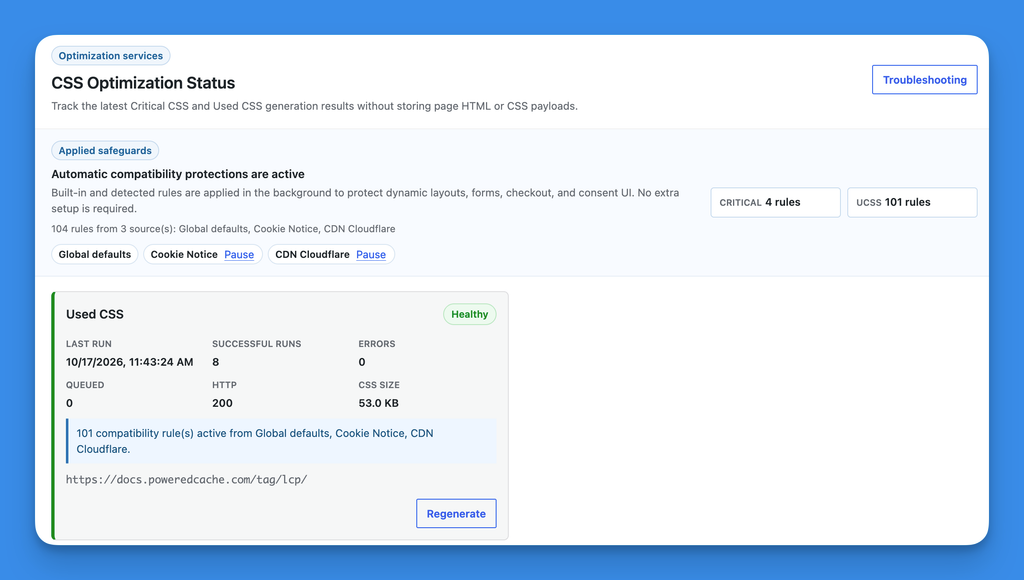
Critical CSS and Remove Unused CSS can provide substantial performance gains, but they also interact with themes, page builders, dynamic components, consent tools, forms, and checkout experiences.
Powered Cache Premium 4.0 introduces a more robust workflow for managing these optimizations.
CSS generation now runs asynchronously with visible status information, service health checks, and clearer troubleshooting feedback. Jobs are automatically cancelled when the related feature is disabled, stale requests are ignored, and CSS is regenerated when relevant inputs change.
The new workflow also respects page-specific optimization settings and avoids continuing work that is no longer relevant.
This makes CSS optimization more predictable while reducing the amount of manual intervention required.
Automatic CSS Compatibility Safeguards
Powered Cache Premium now applies compatibility safeguards based on the active theme, plugins, templates, and site configuration.
These safeguards help protect dynamic layouts and important interface elements from overly aggressive CSS optimization. Common examples include navigation menus, forms, consent interfaces, account pages, carts, and checkout components.
Applied safeguards are visible from the CSS Optimization Status panel. Advanced users can review their sources and pause individual compatibility packs when needed.
The safeguards do not force recommended settings or prevent manual configuration. They provide a safer baseline while preserving control for users who need it.
More Reliable Background Processing
Powered Cache 4.0 adopts Action Scheduler as the shared foundation for background work.
It now powers tasks such as:
- Cache preloading
- Cache purge operations
- Database cleanup
- Critical CSS generation
- Remove Unused CSS generation
This provides better visibility, scheduling, retries, and queue management across different hosting environments.
We also added lifecycle protections around these jobs. When an optimization feature is disabled, its pending work is cancelled instead of continuing in the background. Stale jobs are ignored, and interrupted upgrades can recover more safely.
These changes happen mostly behind the scenes, but they make everyday operation significantly more dependable.
Smarter Compatibility Across Hosting Environments
WordPress performance does not exist in isolation. Hosting-level caches, reverse proxies, object cache extensions, CDNs, and security services all affect how a caching plugin should behave.
Powered Cache 4.0 improves this experience in several ways:
- Object cache options are only offered when their required PHP drivers are available.
- Sucuri cache purging is now supported.
- Managed hosting and edge cache configurations receive more relevant guidance.
- CDN zones can use different hostnames for images, JavaScript, CSS, or all assets.
- Compatibility notices avoid unnecessary warnings for intentionally disabled settings.
- The new Fix configuration action can restore
WP_CACHEand Powered Cache drop-ins from saved settings.
This reduces misleading controls and gives users a clearer path when another plugin, deployment, or hosting change affects the cache configuration.
Better Lazy Loading and Media Handling
Lazy loading has been modernized to work more reliably with current WordPress sites.
Powered Cache can now detect dynamically inserted content and lazy load supported media as it appears on the page. Background images are also covered, helping sites built with page builders and interactive components benefit from lazy loading.
Premium users also receive improvements to LCP image prioritization and automatic image dimension detection. Missing dimensions are added only for locally hosted images, avoiding unnecessary requests to external websites.
Local Google Fonts caching has also been strengthened with safer requests, broader stylesheet support, and temporary failure caching.
Safer and More Flexible Exclusion Rules
Exclusion rules now support the * wildcard across areas such as:
- Never Cache URLs
- File optimization exclusions
- Lazy load exclusions
- CDN exclusions
Powered Cache also handles malformed patterns more safely. One invalid line will no longer prevent the rest of an exclusion list from working.
Rules copied directly from asset URLs, including query strings such as app.js?ver=2, can now be matched as literal text where appropriate.
This gives advanced users more control without making configuration errors unnecessarily destructive.
Improved Preloading and Database Tools
Cache preloading now has stronger lifecycle and request protections, including safer sitemap handling and better behavior when settings change while a queue is running.
Powered Cache Premium can continue using local loopback requests for development environments while applying stricter validation to external sitemap requests.
Database cleanup can now also be started manually from the Tools section. Table optimization has been corrected for MySQL 8 and is limited to WordPress database tables.
A Safer Upgrade from Powered Cache 3.x
Powered Cache 4.0 includes migration support for existing installations.
Your saved settings are preserved while retired background processing data is cleaned up and moved to the new queue foundation. Existing configuration is not replaced with recommended defaults during the upgrade.
Before updating, please note the following requirements:
- WordPress 6.5 or newer is required.
- PHP 7.4 or newer is required.
- Powered Cache Premium 4.0 requires Powered Cache 4.0 or newer.
- Premium users should update the free Powered Cache plugin first, followed by Powered Cache Premium.
- After upgrading, save the settings once so existing page cache exclusions can use the new wildcard matching behavior.
As with any major WordPress update, we recommend testing the upgrade on a staging site and taking a current backup before updating production.
Built for Better Defaults, Not More Settings
Powered Cache 4.0 is our largest release so far, but its purpose is not to make the plugin feel larger.
The work behind this release is focused on reducing uncertainty: recommending sensible defaults, detecting compatibility requirements, stopping irrelevant background work, and making advanced optimization easier to monitor.
You can still fine-tune individual settings when needed. The difference is that Powered Cache now provides a stronger starting point and more protection around the decisions that matter.
Upgrade to Powered Cache 4.0
Powered Cache 4.0 is available from your WordPress dashboard and the WordPress.org plugin directory.
Powered Cache Premium customers can update both plugins from the WordPress Plugins screen. Remember to update Powered Cache first, then Powered Cache Premium.
Explore Powered Cache Premium to unlock Critical CSS, Remove Unused CSS, LCP optimization, image delivery, premium integrations, and priority support.
For every technical change included in this release, see the complete Powered Cache changelog.